
Scan this QR code with Salam to join the chat room
If your device hangs at the Zinwa screen after installing the above package, but is not bootlooping, as long as it's been stuck there for 10 minutes or more, it should be safe to hold down the power button to restart the phone.
Install from stock OSThe "update available" notifications are silent, to be less annoying, but some launchers or notification management apps may hide the install button.
The above links are the "base" image, install using the exiting Zinwa OTA update process. Once your phone reboots, you will receive the OTA update to BenOS Valarie via the OTA app.
Technically a beta release, but all that means is that logging is enabled, in case you run into any issues, but I don't expect any major bugs... I've been debugging it for weeks and it should be pretty solid at this point.
The most up-to-date release / install notes will be presented during the update process. That message should be trusted above any info I have yet to update here.
This release deprecates most of the install instructions on the webpage. I will remove / update them soon.
Installing this update (or installing for the first time) is a 2 part process. First you will need to install an OTA package from the stock updater (in the About page of System Settings). This first install will give you the new OTA update app, from which you should get a notification about an available update. That second update will be the OS you seek.
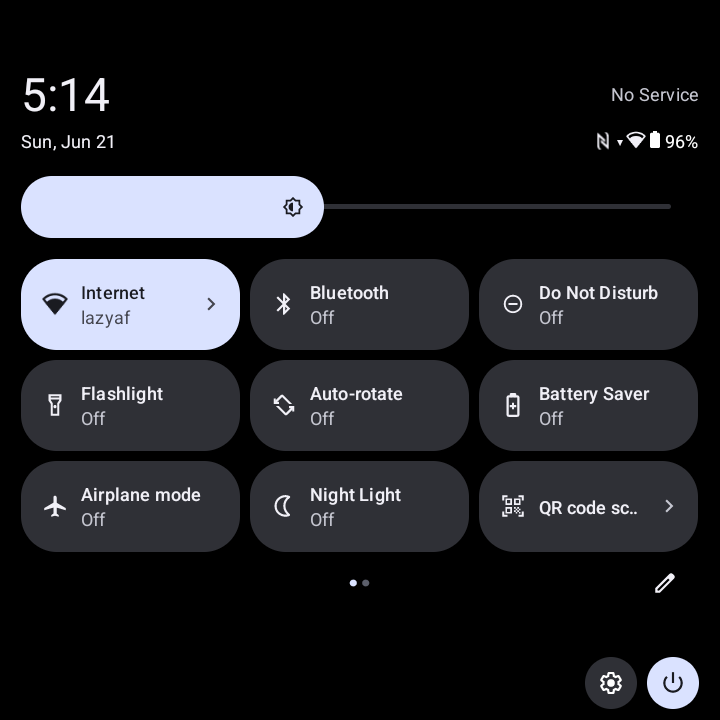
This update includes a proper OTA update app / server and makes much of the install instructions below no longer relevant. Additionally, the biggest feature is a fair amount of UI tweaks and changes that make the Q25 far more usable with its small screen. I'm sure you know how annoying the notifications drawer is; how it wants to roll up or roll down the quick settings when you're trying to scroll through your notifications.... well that should be fixed now. Notification pop-ups have been made smaller, so they no longer take up a full third of the screen. Quick settings tiles have been changed to a 3-column config, allowing for more to fit on the screen, while keeping everything "above the fold," no more vertical scrolling in the quick settings! Some changes to how wifi negotiation works, blah blah blah.... Oh, also keymapper boot fix is included, allowing for physical keyboard PIN entry on the lock screen. I'll post proper details shortly. I'm looking for a few people willing to test it out (shouldn't be any real issues, and those who have tried it so far have been pleased with it. Shouldn't be too risky.) If you're interested, hit me up on the web chat and I'll get you set up.
At this point, I would recommend going with this pre-release for new installs. When installing, you'll be presented with a warning about the possible system app conflicts, reminded to save your configs / backup your data, and the OTA installer will automatically uninstall them (after you agree to proceed) to prevent bootlooping and greatly simplifies the install. Ideally, at some point, I'll add automatic backups to this process, but that doesn't exist at this point.
Install instructions below this line do not apply to BenOS-Valarie
If you are already running BenOS, just install the update. You don't need to uninstall any modules to prepare.
(now with 100% less Error 51)
.pit_installed control file is now orphaned, .pit_installed_u is now used.Note: after applying an OTA update, the phone may run slower temporarily while it reconciles boot slot A and B. This should take less than an hour. Send me an email or message on xmpp if there are any issues that don't resolve themself.
Below the line is primarily for new installs
!!BACK UP YOUR DATA AND APP CONFIGS BEFORE UPDATING!!
(You should be doing that anyway)
!!FOR BEST RESULTS, BE SURE TO READ THE INSTALLATION NOTES BELOW!!
!!YOU MAY NEED TO RE-ADD YOUR GOOGLE ACCOUNT AFTER UPDATING (pls lmk)!!
(putting a file named .gapps_cleaned on the main / top directory of the device
storage before updating will prevent running the "nuke the cooked apps" script on first boot)
!!PHONE WILL AUTOMATICALLY REBOOT 2X AFTER FRESH INSTALLATION OF THIS ROM!!
/data/data/com.google.android.gms to restore app functionalityWith the Uma.1 update, there is no longer any manual configuration necessary for Play Integrity!
Seriously.... read the whole post. If you hit me up for help, the first thing I'm going to ask is if you read the whole post
This ROM still contains Keymapper v3. If Keymapper disappears after the update, or you otherwise know you were running v4 previously, use the supplemental OTA update to restore Keymapper v4.
Problems? Web Chat: Click Here or scan the QR code
Email oops@digitalsand.photography
or hit me up on
XMPP oops@chat.digitalsand.photography
(any XMPP client or account can be used, or
https://dgsd.ph/UKCqZc that invite link can be used to make an account on my
server)
com.duc1607.q25led)com.duc1607.resolutionchanger)tech.shroyer.q25trackpadcuztomizer)com.blackberry.keyboard)com.blackberry.keyboard).pit_installed the preceding dot will make it a hidden file, but as long as it's there,
the included modules will not be installed.
$ adb shell touch /sdcard/.pit_installed or you can use a file manager on the device
to create a new blank file and name it .pit_installed or you can download the file
linked here, save it to the main / top level of the internal device storage, then rename it, adding
the . in front of the name. It should "disappear" after you rename it, but it is still there.com.duc1607.q25led)com.duc1607.resolutionchanger)tech.shroyer.q25trackpadcuztomizer)com.blackberry.keyboard)com.blackberry.keyboard)The following functions can be controlled by "dot files" (hidden files that being with a "." character) on the top level / main directory of the internal user storage:
.adblock_disabled.keyboard_reset.k32_installed.pit_installed.gapps_cleanedThis can be done with the included FOSS FM app (green file manager icon), simply open it and select "Temporarily Show Hidden Files" from the menu in the top right corner. Files can be added from the + icon and selecting new file, just type the appropriate name into the text field, hit OK, and reboot. Be sure to include the preceding . in the file name (you shouldn't see the file you created, unless you enable show hidden files).
Full packages will always contain the latest release. If you are doing a new install, you will be up to date and will not have to run an additional update after installing.
If for some reason you need an old release, contact me.
Uma.1 Update OTA (incremental)
Incremental update is for those running the initial release of BenOS-Uma. If you are still running a pre-release
build or if I gave you an personal update package, you'll have to use the full OTA package.
Also, keep an eye out for an experimental build that implements blocking of Google's remote feature provisioning (hopefully to block the September update that cooks installing apps from non-Play Store sources.)
Patched ExternalStorageProvider.apk for stock Zinwa ROMs
Simply install this .apk file (should install as an update on top of the existing one) to patch CVE 2024-43093 on
official Zinwa ROMs
If you are in a position to do so, and are so inclined, any and all donations are greatly appreciated. However, you are under no obligation to do so. Whether you donate or not, you are appreciated and I am glad to have folks enjoying my work. Thank you!
Most of this was done via decompiling and reverse engineering, so a lot of the source code just doens't exist. However, what has been done with GPL-licensed code is on my Github (along with other random modifications to software I've made).